I saved a bunch of unfamiliar words from the internet, but when I opened them over the weekend, I realized I didn't recognize most of them.
The problem is usually not that "word highlighting is not frequent enough", but rather...No reviewSimply inputting without reinforcing the knowledge is insufficient.Web-based vocabulary listIt will become electronic waste paper.
Review English while browsingThe solution is to archive words while browsing and practice them again in a short time when they are due—without needing to open a separate vocabulary book or sit down at a desk.
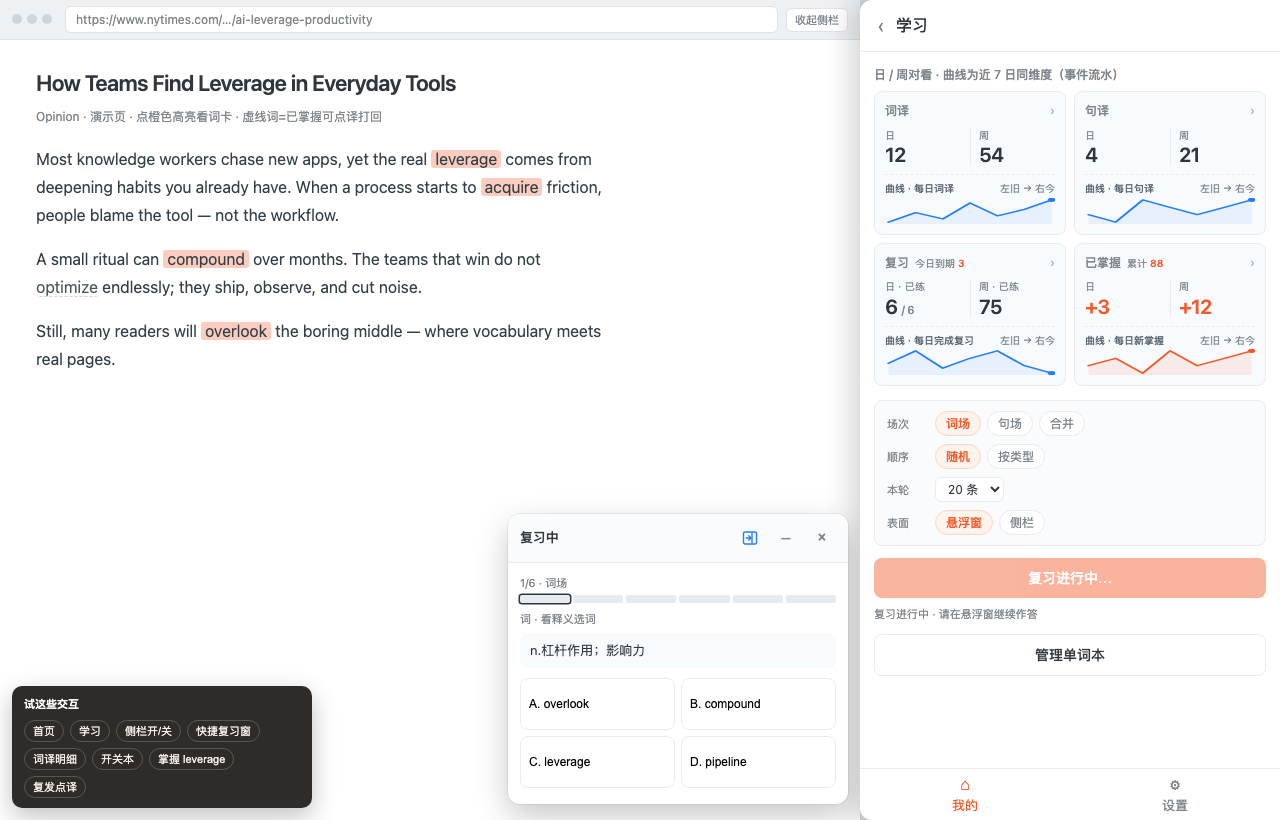
LingoWay has created a closed-loop review system: users can view today's practice questions on the learning page, start practicing using a quick floating window on the webpage, revisit incorrect questions, and review past notes. It completes the process.Painless English Learning MethodThe most easily skipped step in the process—You need to review after inputting..
1. Why "Just Save" Isn't Enough
English vocabulary reviewThe core is not "how many words were added today", but "whether the expired words have reappeared".
The basic conclusion of spaced repetition is quite simple: newly learned content is quickly forgotten, but testing at appropriate intervals leads to more stable memory. (Open source tools) Anki The documentation also explains interval and review scheduling as core mechanisms (see...). Deck Options).
| practice | Outcome bias |
|---|---|
| Highlight words only, save only | Vocabulary notebooks are getting longer, but recognition rates aren't improving. |
| Scan the list over the weekend | It's somewhat useful, but difficult to maintain and schedule. |
| Practice begins on the due date + review of incorrect answers | With its short duration and clear pace, it's closer to a productized version of the "weekend review" approach in painless English learning methods. |
Browsing Reddit during your commute or practicing a few problems while reading documents during your lunch break—that's exactly the pace you need for fragmented scenarios.
2. What does a closed-loop review process look like?
Browse the webpage and highlight words/sentences ↓ Word and sentence translation details "Add to Review" ↓ Forgetting Curve Schedule → Due Today ↓ Study Page "Start Review" or Quick Floating Window ↓ Three Question Types Practice (Revisit Incorrect Questions) ↓ Advancement/Next Due Date · Records Can Be Reviewed
Open the sidebarLearning PageThe four cards were aligned at a glance for action:
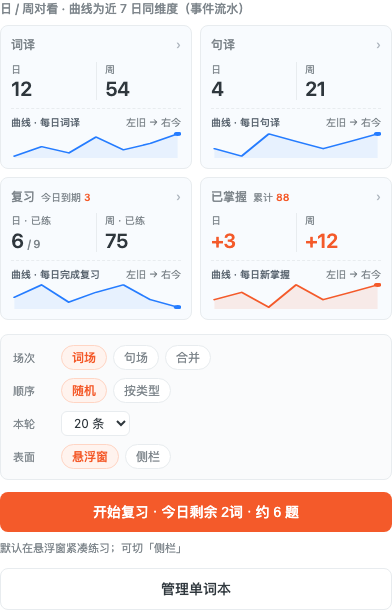
| Card | What do you see? | Next step |
|---|---|---|
| Translation | Today's/This Week's Active Word Lookup Volume | The detailed translation list can be added to your review. |
| Sentence translation | Today's/This Week's Sentence Translation Volume | The detailed translation of each sentence can be added to your review. |
| review | Daily practice completed, due today. | Start training or see the deadline list/record |
| Mastered | Daily new and cumulative data | Confirm the number of words memorized over a long period of time |
The same page can be configured with: session (vocabulary session/sentence session/merged), order (random/by type), number of entries in this round, and practice surface (floating window/sidebar). The main button will display something like "Start Review · N words remaining today · approximately M questions". The configuration page also has...Memory CurveThis explanation helps you understand "why we need to practice these things today".
3. Five Steps to Getting Started: From Word Selection to Completing a Round of Practice
Step 1: Highlight words while browsing and archive them first.
Open the English site (Twitter / Reddit / Medium / Documentation) and use LingoWay. Instant webpage translation/word highlightingAdd new words or example sentences to your vocabulary notebook. Once you have a resource library, you'll have something to practice later.
Not installed yet? See:How to install LingoWayFor a comparison of word highlighting with other translation tools, see:A comparative review of instant web page translation tools.
Step 2: Add "Review" to the details.
Not every word in the list will automatically be added to today's practice. Words or sentences that need strengthening will be added later.Detailed word translations / detailed sentence translationsClick "Add to review" (it will be marked "Reviewing" after you join).
Entering the pool is a proactive choice, avoiding the anxiety of having "a screen full of exercises to do"—this is also a sustainable approach.English vocabulary reviewThe key.
Step 3: Check today's practice schedule and select an entry point to start practicing.
- See the review cards on the learning pageExpiry date todayCompared with the progress of practice
- Click the main button to start practicing; if the remaining number is 0, then today's practice session is complete.
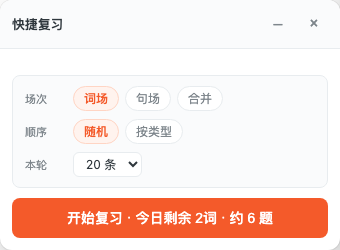
- Or openQuick Review Floating WindowConfiguration is synchronized with the learning page, allowing you to start practicing anytime while browsing.
The two entry points share the same session, not two separate ledgers.
Step 4: Practice Questions: Question Type Tags + Review Incorrect Questions
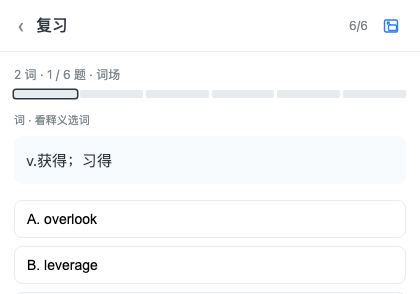
There are three types of questions for both vocabulary and sentence structures, for example:
- wordChoose words based on definitions, fill in the blanks in context, and select definitions from words.
- sentenceChoose the original sentence from the Chinese summary, fill in the blanks in the original sentence, and choose the summary from the original sentence.
The interface features question type labels and progress indicators (e.g., "2 words · 1/6 questions · Vocabulary section"), and the bottom bar displays "Previous Question / Leave / Next Question".
If you answer incorrectly, you'll practice again, and try to change the question type—seeing the same word from multiple angles is more effective than mechanically repeating the same question. Items that pass all types in this round will be ranked according to the curve; items that are due but not passed will reappear in the next practice session. There's a submission status, and a completion feedback message.
Step 5: Review the records and delete anything that needs to be deleted.
You can see it in the review details.Expired words/phrasesandReview RecordThe records support pagination and deletion. The learning page will display the number of records you have mastered, so you can see "how much you have memorized" instead of just "how much you have saved".
4. Quick Floating Window: What scenarios is it suitable for?
| Scene | A more suitable entry point |
|---|---|
| I'm reading a long article and don't want to lose focus. | Quick review pop-up (can be minimized to a small bar) |
| I want to see what expires today, what I've already mastered, and what configurations I've changed. | Sidebar Learning Page |
| I wanted to switch to a larger screen to do the questions halfway through. | Floating window ↔ Sidebar switchingDo not open a new session |
The floating window displays the session/sequence/number of sessions in the current round, synchronized with the learning page, as well as the "Start Review - Today's Remaining..." button. Closing it when not in use simply hides it; leaving during practice will confirm the session, preventing accidental closure and loss of progress.
5. How to choose between "Only browse the list" and "Only sync Anki"?
| Way | advantage | Limitations |
|---|---|---|
| Weekend vocabulary review list | Zero learning cost | Difficult to maintain, no deadline for scheduling |
| LingoWay Review Loop | Embedded in the browser; clear upon expiration; practice mistakes again. | You need to actively "join the review". |
| Anki and other external SRS | Mature ecosystem, strong mobile capabilities | To export/sync, leave the web page context. |
Both can be used: Closed-loop digestion within the station.Expiry date todayFor high-intensity cross-device synchronization, use Anki in conjunction (see instructions).Function Page).
6. How to run a 30-day trip (suggested pace)
There's no need to aim for big games every day. A more stable approach is:
- Weekly browsingContinue highlighting words as usual; when you encounter words/phrases you want to remember, add them to your review.
- 5–15 minutes dailyClear "Today's Remaining" from the pop-up window or learning page.
- 10 minutes on weekendsReview your study notes and what you've already mastered, and delete any invalid sessions; you can refer to the vocabulary list for difficulty. CEFR Guidelines
- Input source:useRecommended high-quality English learning websitesThe tiered stations within the system ensure a stable input.
Results vary from person to person. A more worthwhile metric to monitor is the performance on the learning page.Daily practice completed / Should I reset it today as it's due?,as well asWe have already determined whether the cumulative increase is slow.—This is more meaningful than just focusing on the total number of collections.
FAQ
What is it to review English while browsing?
This approach involves highlighting and archiving words while browsing English websites, then practicing them briefly on the due date according to the forgetting curve, rather than creating a separate vocabulary book. LingoWay connects these two steps into a closed loop using learning pages, quick pop-ups, and practice questions.
What is the relationship between LingoWay review and Anki?
Both utilize the concept of spaced repetition. The closed-loop approach allows for direct practice within the browsing environment; alternatively, vocabulary can be synced to Anki for external review. Both can be used together. See details below.Function Page.
What's the difference between the quick review pop-up and the sidebar study page?
The same set of review sessions, two separate interfaces. The floating window is suitable for uninterrupted reading; the learning page is suitable for viewing overviews and configurations. You can switch between them after starting practice without opening a separate ledger.
Can words and sentences be practiced together?
Yes. Sessions can be selected as word-based, sentence-based, or combined. The number of questions and the order of questions in this round are adjustable.
What happens if I answer incorrectly?
The question will reappear in this round, and we will try to change the question type. Only if you have answered all the relevant questions in this round correctly will the item be ranked further down the list.
Why can't I remember all the words I've saved?
Adding words to your favorites is just input. Adding words to your review pool and completing today's due words is more effective than constantly piling up new vocabulary.
Next step: Start reviewing English while browsing.
- Install LingoWay(If not already installed)
- Open the sidebar study page, confirm the four cards and click "Start Review".
- Browse any English page, highlight a few words and "add to review," then use the floating window to complete the rest of your practice for the day.
Membership requirements and pricing will be discussed later. Plans(Annual $26.9 / Lifetime $56.9).
 EN
EN  ZH
ZH